Available for  MacOS and
  Windows
Don't Let Anyone Peek at Your Private Stuff
Instantly blur sensitive data on your screen while recording or screen sharing - no post-editing needed.
Rated 4.9/5 by 158 customers
What our customers are saying
Rated 4.9/5 based on 20 customer reviews.
I can't believe it's so reasonably priced and easy to use. If you need to blur out your screen, this is the app for you.
Such an important little utensil — I take screencasts every day and it's reassuring to blur parts of what's displayed. Sanskar takes great care of his customers.
Simple and fast to use. The best I've found at doing what it does — highly recommended.
Quick, easy and an essential tool for anyone sharing screenshots or videos with sensitive info. Sanskar responds quickly and is very helpful.
45 minutes in an editor, or 3 seconds before you record?
Blurring sensitive info in post-production is slow, error-prone, and impossible for live calls. BlurScreen hides it the moment it appears on screen.
Blur in post-production
Premiere, Final Cut, CapCut…
keyframe → re-export
Blur with BlurScreen
Live, before data ever hits the recording.
keep recording
Blur Anything Anywhere in seconds
Launch with a simple shortcut, draw a rectangle, press esc and you are done.
Just Draw a Rectangle
Click, drag, done. Hide anything sensitive in one second.
- ✓Hide emails in Apple Mail or Gmail while screen sharing
- ✓Cover browser URLs, tabs, and bookmarks
- ✓Blur anything — text, images, entire windows
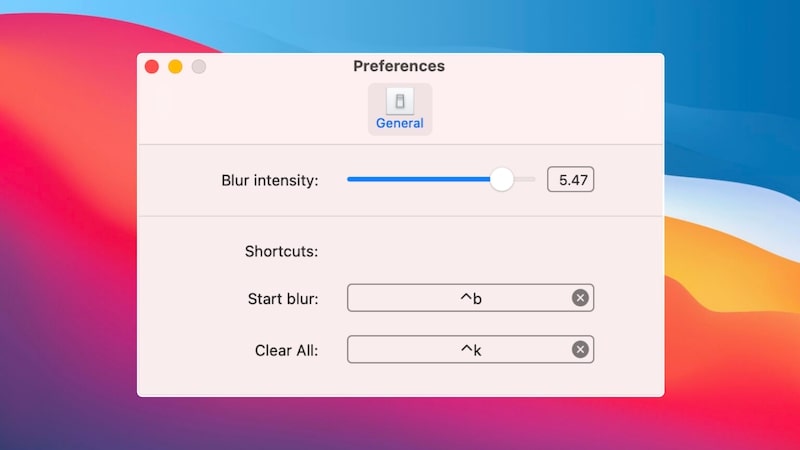
Shortcuts & Controls
Blur or clear in a single keystroke — your hands never leave the keyboard.
- ✓⌃⇧B to start blurring
- ✓⌃⇧K to clear all blurs
- ✓Fully customizable — pick shortcuts that fit your flow
Works with every meeting app
No integrations. No plugins. Just works.



Frequently asked questions
If you screen share for meetings, recordings, courses, or content — yes. You'll always have something to hide.
No. It only covers parts of your screen — it doesn't read or send any data.
Yes — Zoom, Loom, Google Meet, Berrycast, and every other screen share tool.
Email sanskar@blurscreen.app and we'll refund you — no questions asked.
Each license covers a set number of devices. Deactivate and activate anytime at blurscreen.app/my-account.
Yes. We store nothing sensitive and never touch your screen content.
Yes — URL bar, folders, menu icons, anything on screen.
Plans & Pricing
Have a peace of mind when screen sharing and save time from post production video editing.
Basic
$19one-time
What's included
- 1 Active device
- 1 year of updates
- Sync across devices
- Works with All. Zoom, Loom, Gmeet, Berrycast and others
- GDPR Compliant
- 5 day easy refund policy
Professional
$47one-time
What's included
- 3 Active devices
- 1 year of updates
- Sync across devices
- Works with All. Zoom, Loom, Gmeet, Berrycast and others
- GDPR Compliant
- 5 day easy refund policy
- Priority Support
Team
$97one-time
What's included
- 10 Active devices
- 1 year of updates
- Sync across devices
- Works with All. Zoom, Loom, Gmeet, Berrycast and others
- GDPR Compliant
- 5 day easy refund policy
- Priority Support
- Team Management Dashboard